GitHub love and integration
Inside LingoHub

Table of content

As a developer you have to love GitHub (for its simplicity, its flexibility and how it changed the web). That is why LingoHub has provided a GitHub integration from the beginning. We just released a small update to this integration, and we noticed our public documentation doesn’t reflect all the possibilities yet. So here is how you can authenticate through GitHub and get the most out of connecting your GitHub repository with LingoHub:
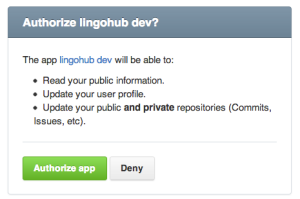
The first authentication redirects you to your Github account and asks if you give LingoHub access to your GitHub account. Here I want to mention two things:
1. We require read/write access to your repositories and to your account information. Sometimes users ask us why we need access to repositories for authentication. We don't need or use this information for the sign-in process, but for other integrations like automatic synchronization of resource files,
2. You can always disconnect LingoHub from your GitHub account, ending the integration.
You can connect your LingoHub project to any of your GitHub repositories. This enables you to automatically synchronize resource files with your codebase without extra manual work. If you haven’t authenticated with GitHub yet, you will be prompted to do so at this point (see ‘Authenticate with GitHub’).

Our whole LingoHub translation workflow extensively uses GitHub integration. I encourage you to give it a try and see for yourself how it simplifies the process enormously. How integrating GIT into your localization workflow works in detail, I also outlined in a previous blog post that I highly recommend, not only if you’re new to this.
Bitbucket localization integration now available in LingoHub
Learn how to integrate Bitbucket with LingoHub to automate localization file synchronization and streamline multilingual software development.
How do TMS integrations help businesses achieve seamless localization?
Learn how integrated translation management systems streamline localization, reduce manual work, improve global SEO, and accelerate releases across markets.

Importance of branching and repository integrations in localization
Discover how LingoHub confidently implements branching for localization. Learn about branching capabilities and Git localization features in our article.

Introducing Packages, Zendesk integration, and a new project wizard
Discover the latest LingoHub improvements, including Packages, a Zendesk integration, and an updated project wizard for smoother localization workflows.
